Have a live voice lesson
Live voice lets you speak with the tutor during a lesson. Dictation, reading a text reply aloud, an audio lesson, and a live voice session are different workflows.
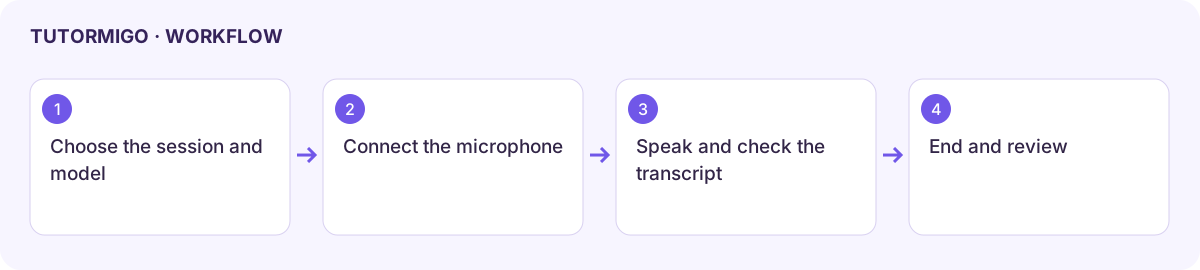
Start and speak
Section titled “Start and speak”- Open or start the intended tutor session and choose its available live voice control.
- Review the model, language, voice, and allowance choices offered. Family policy can allow, restrict, or force a voice model.
- Start the session and allow microphone access when prompted. Use headphones in a shared room.
- Wait for the listening or connection state before asking a short question. Pause to hear the response.
- Check the Voice conversation transcript for important terms, formulas, and names. Use typed input or attachments through the displayed controls when exact detail matters.
Control the conversation
Section titled “Control the conversation”| Control | Use it when… |
|---|---|
| Mute / Unmute microphone | You need to pause or resume your microphone input. |
| Continuous / Hold to talk | You want the offered capture style that fits your environment. |
| Stop tutor reply | You want to interrupt a response before continuing. |
| Expand / Collapse transcript | You need to inspect the text or make more room. |
| Language and model controls | You need to check the choices supported for this session. |
| End voice session | You are finished and want to return to the lesson. |
Mascot visibility, size, and positioning controls affect presentation rather than the learning content. Use the available reconnect or retry banner after an interruption and verify the connection state before speaking again.
Fix a voice problem
Section titled “Fix a voice problem”If input is silent, inspect microphone permission and the selected device. If replies are inaudible, check speaker output and volume. If the transcript mishears a formula, type it and ask the tutor to confirm it. An allowance or model restriction requires account or parent review, not repeated reconnect attempts.
After ending, inspect the saved session before leaving. See AI and language preferences for read-aloud settings.
Workflow at a glance
Section titled “Workflow at a glance”